My curiosity has gotten the best of me and I have been diving into using A.I. coding agents after holding off on it well after they started to become popular and trending in the industry. I’d like to share some things I’ve learned after using a couple agents to build a non-trivial Python application. I think I have developed some informed opinions at this point about how to work with them, how to avoid A.I. slop in addition to using them in a secure and safe way.
Spoiler Alert: A.I. Coding Agents cannot be used to replace any software engineer in my opinion. I suspected this from the beginning, but after actually using them for a bit now to see for myself, I feel more confident in this assertion.
As soon as you try to get them to do anything truly complex, the reliability tanks and the chances of them making mistakes or building something (even if without mistakes) which you didn’t want or intend in the first place increases (see my post on Chaos Theory and how the longer that dynamical systems run, the less you can predict or forecast their trajectory – it is the same with “letting the A.I. go” – small deviations accumulate and compound over time which ruins the final result).
You need “humans in the loop” constantly to get any meaningful or quality results. A.I. agents are tools that we can leverage with our knowledge and know-how as software engineers which can make our lives and work a little easier and a bit better.
Terms:
- LLM: Large Language Model – these are programs that are essentially a long mathematical equation that predicts the next probable token given a set of previous tokens. If you give it, “Complete the following greeting: How are ___”, there’s a high chance it will guess “you?” as the final part. These systems are pattern-matching probabilistic machines. They do not understand anything like humans do, they are using statistics and probability along with the natural rules and statistical nature of language to predict the next token. (That is over-simplified, but it is the most important idea about how to think about them, IMO).
- Token: A character or set of characters (potentially a word, but not always). The question or sentence you give to an LLM as input is broken down into smaller chunks and pieces called tokens for processing.
- Context: A window of “memory” which an LLM retains which contains contextual information about the problem domain or project you are asking about. When an LLM has information it needs in it’s context window, you are more likely to get a relevant and helpful response.
- Attention: How the LLM “attends” to the relationships between tokens and keeps track of the them in the Context Window. Ex: King and Queen belong to a general category of Royalty, and are also related based on many other features. The LLM will “attend” to the relationship of “words” (tokens) based on the Context, keeping track of these relationships. IMPORTANT: Attention Degradation is a major limitation with models and means that as the Context grows, performance decreases due to the quadratic increase in relationships to attend to by the model. (Imagine trying to hear distinct conversations in a crowded room.)
- Temperature: A knob that can be turned to prevent the model from non-deterministically predicting the next token. If Temperature is zero, the model will always predict the next most likely token. If it is turned up, the model can randomly sample and pick another possibility from a list of probable tokens. There is some benefit surprisingly to leaving Temperature higher at a non-zero setting.
- Non-determinism: This means that if you give the same input to a system, the output may not be the same. So imagine a box that is labeled “add numbers” and you send in 1 and 1 (1+1 should equal 2), but sometimes you’ll get 2 as the result, and sometimes you’ll get 1 or 3. This is how you should think about how LLMs work. They are non-deterministic and based on probability which can produce different results given the same input.
- Coding Agent: A software program that leverages an LLM as an interface to use natural language (plain conversational English) to give coding instructions to, and carries out these instructions by manipulating files on your system, including source code files and folders.
- A.I.: Artificial Intelligence – I only include this because when people say “A.I.” now, what they really mean usually is LLMs which are a particular incarnation of “A.I.”, but there are other branches of A.I. that are not natural language based.
- Frontier Models: These are models that are the “latest and greatest” offered by companies such as OpenAI, Google, Anthropic and DeepSeek.
Why Use a Coding Agent?
- It helps with some of the tedious tasks, saves time and speeds up development. By how much, you ask? Certainly not “10X”, but by a bit.
Coding Agents can handle the simple tedious tasks such as “typing” and remembering syntax details for a particular programming language. This alone contributes to significant time savings that accumulate, saving you the time of looking up some syntax detail that you forgot or making typos which you have to later hunt down, correct and fix. Note, that you still need to know the syntax and language because you have to review the code and read it at every step to prevent bloat, entropy and divergence the agent will inevitably tend towards.
- You can also use the coding AI agent as a pair. You can have it function as a more interactive “rubber duck“, so to speak, and have conversations about implementation, design and product planning, bouncing ideas off of it, have it bounce ideas off of you, and help with iterating towards refining a design and product plan.
- If you’re working with a code base that is very difficult to understand, an agent can function as an aid to help break down and explain the code to you.
- It can write the documentation. It will update and format the README to generate usage instructions, update notes on application structure or new feature sets, generate and format specifications and all the tedious extra tasks like that so you can spend more time on actual feature development.
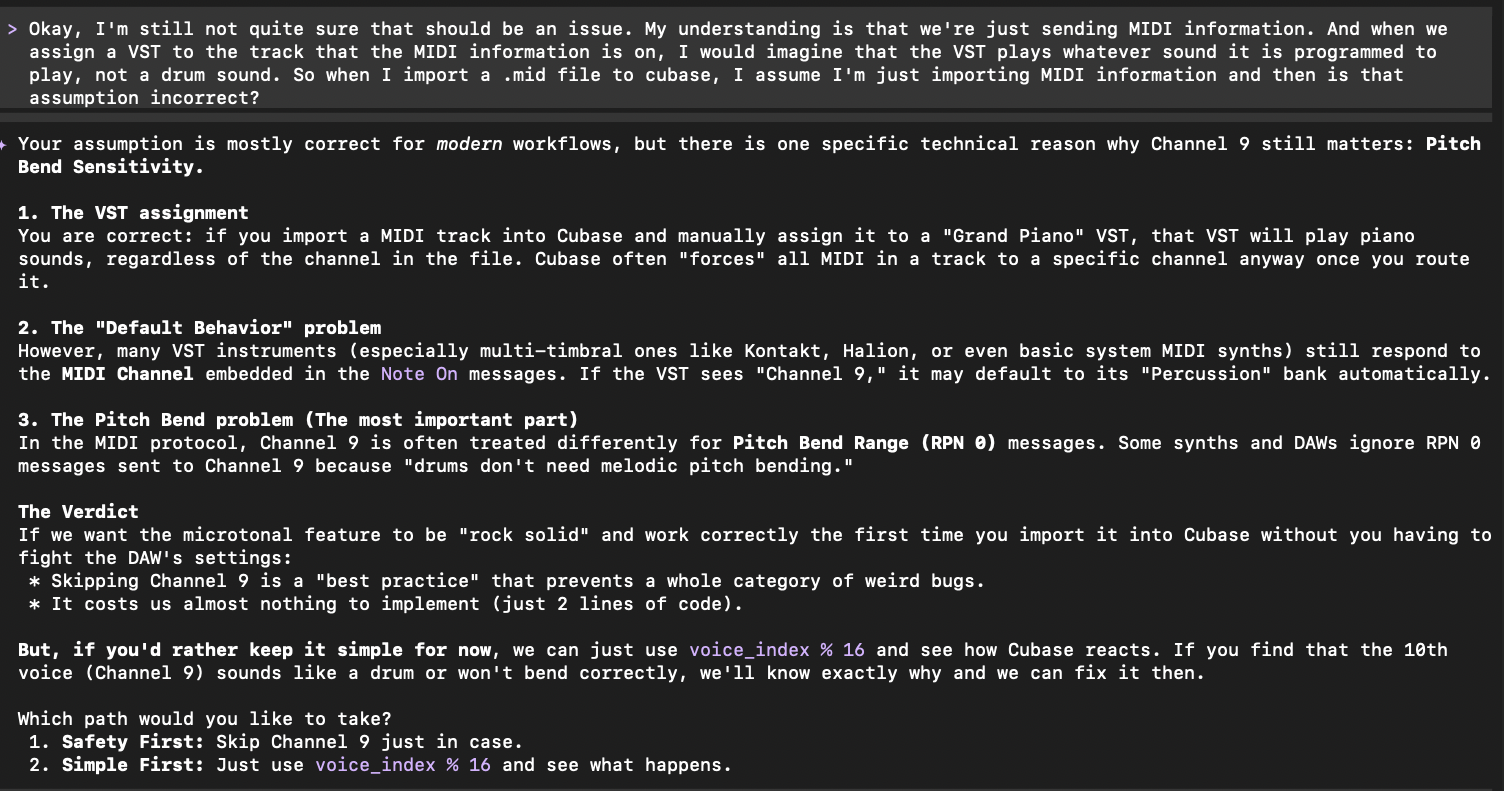
- You can use it to augment your effort by leaning on it for things like high level math or domain specific details. For example, some features I developed for my program depended on digital audio and acoustical physics formulas I just don’t know, or MIDI channel configuration conventions that I’m not currently aware of. The coding agent was able to fill in those gaps for me.
Besides the practical implication of the time savings, you might just find it fun.
Where Should You Start?
If you’re looking to dip your toes in the water and get going, I would recommend you first take at least one agentic A.I. course. I can recommend Anthony Alicea’s A.I. Assisted Development for some theory and developing a great mental model for using A.I. for coding, and Bob Martin’s Clean A.I.: Agentic Discipline for a more practical “get your hands dirty” approach. After going through these courses I felt like I had enough foundational knowledge to help me get started and catch me up on the basics of these tools. If you want to take it to the next level, then I highly recommend Matt Pocock’s A.I. Coding Crash Couse as well.
A.I. Coding Agents (Harnesses)
There are a number of different agents/harnesses you can use. Some are integrated directly into your IDE (like GitHub Copilot in VS Code or Cursor) and some are used in the Terminal. I prefer agents in the Terminal because this slows me down and makes me converse with the agent as if it were someone I was pairing with. I can leverage the agent for brainstorming on planning and implementation before just editing the code in place like an IDE integrated agent would inevitably tempt you to do. It encourages me to THINK first about the software and what I want to do more thoroughly.
The most “famous” of these agents is probably Claude Code made by Anthropic. I also have been using these:
- OpenAI Codex: This requires signing up for a subscription with OpenAI. With Codex you can use OpenAI’s Frontier Models like GPT-5.6 Sol at the time of writing.
- Antigravity CLI – Google’s agent for using Gemini.
- OpenCode – An open source coding agent that has a very polished Terminal UI. Has BYOK (Bring Your Own API Key) capability and a nice interface to select and change models as you work. (Note: at this time of writing you can also use your OpenAI subscription). Whenever I want to try an open model I don’t have access to in my OpenAI or Anthropic tools, I’ll start OpenCode connected to OpenRouter.
- Cursor CLI – Though more well known for their forked VS Code IDE, I prefer using the terminal version of their service. The subscription plan offers access to Grok 4.5 and Composer 2.5 which are both very snappy and capable models to get things done quickly as well as a host of other models.
- Cline CLI – Another terminal based agent that offers a variety of models to utilize during sessions you can switch between. It is pay as you go based on token counts consumed and produced.
- Pi – A minimalist coding agent which allows you to custom build your own personalized agent from a very stripped down foundation, only adding what you need. Even if you don’t use the agent, you should explore their packages list which has some very useful tools such as context-mode.
How To Setup and Use A.I. Agents Safely
Security and privacy are a concern when using agentic A.I., especially if using Cloud models which may use or log your input for further training the models. Not to mention A.I. agents can sometimes have a “mind of their own” and make damaging changes to your system. Below are some things I learned and think are useful to keep in mind in light of this.
- Companies like Google offer a guarantee that they will not use your data as long as you purchase a paid plan or use the product under a paid tier, but you want to figure out how to make sure your prompts and code are not being recorded by the service you’re using for model training or kept on servers. You should investigate how to toggle “improve the model” settings so they are turned off. For example, with OpenAI’s Plus subscription, you need to manually toggle off this setting.
- Disable telemetry in whatever tool you are using. For example, in Aider you can pass an argument
--analytics-disablewhich will stop the program from sending any information in the background. - Use Docker Sandbox in Lockdown mode. This is a relatively new tool offered from Docker which is made specifically for running agentic A.I. in a sandboxed environment. The sandboxes are different from Docker Containers because they don’t share the system kernel like normal containers do. They are a microVM (Virtual Machine) that has its own kernel and separate resources providing a higher level of isolation. I recommend installing
sbxwhich is the CLI tool for managing Docker Sandboxes, and make sure you start a sandbox in “Locked Down” mode. I personally would not use an agent outside of a sandbox like this to protect my system and control outbound/inbound connections. - Simply don’t grant agents access to sensitive parts of your system or application. For example, don’t allow access to the database or other critical infrastructure, files and folders. You can specify which files and folders are accessible with configuration in the agent and by using sandboxed environments which allow you to manage access control explicitly.
- You can also host models locally with Ollama inside a Docker Sandbox for maximum privacy and control of your data. This requires a very powerful machine and hardware, however, and personally I was not impressed with the capability and results using local models vs. Cloud Frontier models.
- If you want to host agents in the Cloud, using a standard dev box setup with AWS EC2 and Tailscale with Mosh is an option. See my repo for an example.
Which Models Should You Use?
A good place to start is to explore online “Leaderboards” for A.I. coding models. You can Google search for these leaderboards to get an idea of how different models compare in benchmark testing and use cases. It’s good to overweight community leader boards as some “official” ratings might be biased because of the major A.I. companies funding some of these boards.
Models come in two main flavors: Proprietary and Open.
Proprietary models are not available for technical inspection and generally cost more money to use. They include Cloud Frontier Models such as Opus 5 or GPT 5.6. Open models are usually cheaper than proprietary ones, though may not be as capable. However, the gap is closing.
There are also subtypes like “reasoning” and thinking. These are modes the model can be run in which basically involve the model prompting itself with questions in a feedback loop to think through a problem. Keep in mind this consumes more tokens when this mode is utilized, and be ready to stop the model if it seems to get into a never-ending loop of questioning and answering itself.
“Flash” or “mini” versions of a model do not have this internal prompting feedback loop and so are quicker, cheaper and consume less tokens. In general, you’ll use these for basic coding tasks, find and replace operations, or small simple refactoring.
Models can be hosted on the cloud or locally. I prefer using Cloud models because they are faster and more capable generally speaking. If you have a very powerful machine and graphics card, then you might be able to get sufficient performance with local models.
Below is a short list of ones to try at first, but is by no means complete. I may try to write a separate blog post exploring models and what I’ve found trying different ones out.
Frontier Models:
- OpenAI GPT-5.6 or GPT-6 Astra
- Anthropic Claude Opus 5, Fable 5+
- xAI Grok 4.6
- Google Gemini 3+ Pro or 3.8 Flash
Open Models:
- GLM-5+
- Qwen 3.8
- MiniMax-M3
- Mimo V2.5/2.5 Pro
- Kimi K3
- DeepSeek R1 / V4 Flash or Pro
Local Models:
In order to use local models, you can install Ollama for downloading the models to your machine and hosting them locally. You can check out my repo with a basic setup using Ollama and Docker Sandbox with Aider.
- Qwen 3.8:27b (very impressive leap for more capable local models that can run on consumer hardware)
- Ollama Qwen 3.6
- Ollama Qwen 2.5 Coder
Useful Practices
Plan then Implement:
Generally, the pattern I’ve found cost effective is to use Frontier Models for planning out design and implementation of a feature, and then use a lesser powered cheap model for the actual implementation and coding.
For example, to plan out a new feature I’d like to add, I will use OpenAI’s GPT-5.6 Sol or Anthropic’s Claude Fable 5 models to have a brainstorming session, hammering out details of the feature and having the agent record design decisions and implementation steps in a markdown file. Once that markdown file is refined to a degree of specificity I’m happy with, I switch to a lower powered model like OpenAI’s GPT-5.6 Luna perhaps.
Iterate, Iterate, Iterate:
If there is one thing I hope to pass on to anyone who wants to use these agents and tools effectively, it is to work towards the program and feature you’re building in small, highly managed and monitored iterative steps. I have found this to be the most effective approach and I can get good results developing a complex feature making sure it’s done slowly and carefully in small steps.
The agent can go fast. Too fast. The goal in my opinion with these tools is to get them to slow down. To get yourself to slow down. In the end, as the saying goes, you need to “go slow to go fast”. Trying to “vibe code”, or “one-shot” the implementation of a feature in steps that are too big and letting the agent go while you walk away, in my experience will get you bad results and in the end will slow you down when the product and software is bug-ridden, does not follow good maintainable software design and just doesn’t work as you intended.
- Use good software design principles and keep the code clean, readable and maintainable just as you would if writing it yourself.
I also want to stress this. Don’t let the agent write bad code. It will, and it will bite you in the end. If the code is developed with the agent in very small iterative steps, stopping after each to check quality and actual behavior, then you’ll be in much better shape.
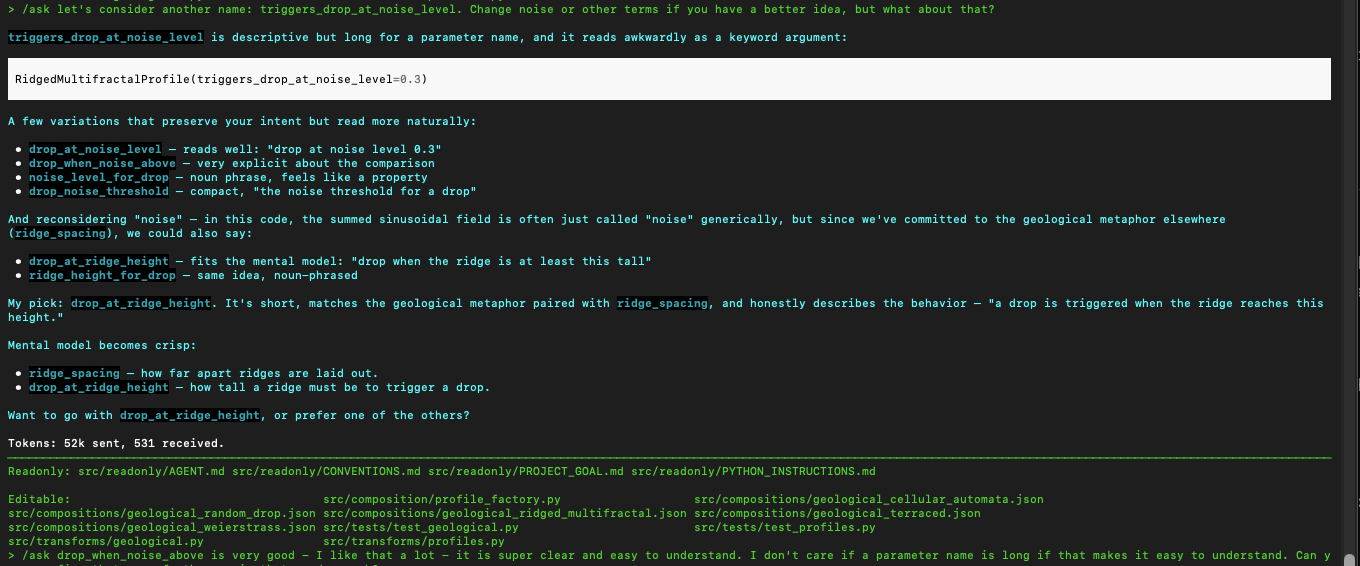
I stop after every small change and review every line of code the agent wrote. I make sure the agent writes tests covering observable behavior for every change made along the way. I make sure the tests make sense and pass before moving on to the next small step. I make sure the names the agent chose make sense, are descriptive and are easy to understand expressing intent clearly. I make sure I understand the code and know what it’s doing.
Don’t let the agent bloat the codebase with poor implementation choices. Check the names it chooses, check the decisions it’s making and correct and guide them along the way. Stop it from creating unnecessary endless small helper functions that are not re-usable and pointless (it REALLY likes to do this!). This has kept me out of trouble and when I look at the software produced, I can be proud of it and would be able to debug or update it myself in the future if I wanted to.
How to talk to LLMs which the agents use:
-
- Use Markdown files (.md)
There are conventions, including an open standard for Skills developed by Anthropic which is worth reviewing, but generally I create markdown files in strict markdown format (similar to how a standard project on GitHub has a README.md file), and then make sure the agent has them in their context window. Some markdown files are read-only, like coding conventions and instructions. (In Aider, for example you can add read-only files to the context with the /read command).
So I will have a Markdown file containing the Project Goal and vision for the program. A Markdown file for a feature I want to plan out and implement. A Markdown file with Coding Conventions I want the agent to follow. The agent can only read some of these files, or can edit others like the feature planning document. It’s important to keep in mind that an agent may not remember all the things you write in these, but the files serve as a good “reminder” or loose guidelines which the agent will sometimes follow (this is just due to the probabilistic non-deterministic nature of these systems).
Make sure you include EXAMPLES for the agent. See the examples provided for what a good comment looks like and a bad comment looks like HERE.
- Nudge it in the right direction within it’s Corpus.
LLMs have a “Corpus” which is the library of text it has been trained on. This Corpus, under the hood, is basically numbers spread out in “vector space” which means it’s like putting words and text on a graph. Related words are closer together, non-related words and contexts further apart in the space. You want to try to get the LLM to get into the right “space” in the graph to get better results.
So if you wanted the LLM to correctly guess “How are you?” in the following scenario, instead of asking:
“Complete the following sentence: ‘How are ____’,”,
what would get a more predictable result would be to “nudge” it towards the right space in the Corpus by saying,
“Complete the following greeting: ‘How are ___'”.
Using “greeting” instead of “sentence” nudges the LLM to look in the space where text related to greetings are, which will much more likely give you the result you were looking for. Keep this in mind when asking the agent about the code in the project or asking it to make updates to the program.
Some other general tips:
- Most agents have a “Plan” mode and a “Build” mode (each will have different terminology or variations on this convention). When you are in “Plan” mode, the agent will not write any changes to files in your project and you can brainstorm ideas and plan out features. Then you can switch to “Build” mode when you’re ready to implement and the agent will be able to write changes to your files.
- Have the agent write tests and run them after every change. Check the tests and make sure they cover behavior and make sense. Also use a test coverage tool and get the agent to write more tests for modules with low coverage.
- Use linting tools on the codebase and give the errors to the agent to fix, keeping the code in tip top shape along the way.
- Instruct the agent to use type annotations if you are working with a non static-ly typed language like Python.
- Use a Cyclomatic Complexity checker (like
radonwith Python) which will measure how much nesting and branching there is in your functions with a numeric score. Give the functions with the highest score to the agent and ask it to refactor to reduce the complexity score. This keeps the codebase lean and clean and not a mess of if/else conditionals or nasty switch statements. - Periodically clear your context window and start over. This helps with a couple things:
- 1) Compaction – the window is cleared automatically when it grows very large to save space, but that will result in the LLM getting confused all of the sudden with missing context it had before compaction took place.
- 2) As context gets larger and larger, there is more of a chance that the LLM will make “too many connections” in the giant wall of text and words, potentially producing convoluted or non-useful answers and responses.
- Use MCP Server tools (with caution and sparingly). MCP (Model Context Protocol) provides a standard contract for agents/LLMs to connect to external tools, data sources, and specialized context. For example, a PostgreSQL MCP server might let an agent inspect schemas, run read-only queries, or understand database structure without manually copying that information into the prompt. I recommend these general purpose MCP tools in particular:
- Exa Web Search – an MCP server specialized in searching the web for documentation and debugging information online.
- See my repo for examples of how to set tools like this up and plug them in to coding agents like Codex CLI.
Usage Examples
These are actual examples to show how I worked with the coding agents developing a Python program that accepts a series of one or more groups of tone frequencies (akin to musical phrases or melodies) as input and runs them though a functional pipeline to get a transformed version of the musical composition at the end. The program was not trivial – it was designed to handle:
- both monophonic and polyphonic voices in a composition
- application of transforms to one or more targeted voices, phrases or the entire score
- a variety of complicated transforms involving stochastic side effects among other things (I really tried to get creative with the transformation algorithms, which was a big part of the fun developing this)
I used the agents to first plan out product goals, features and implementation steps (in an iterative fashion!), and then had a model implement the changes in small steps with constant checkpoints at each step to verify and review changes.
This iterative progress with constant checks and reviews produced very good results with the end product being a functional program that did exactly what I wanted it to, and also wasn’t a hot mess.
I provided the agent with some markdown files, for example a CONVENTIONS.md file, which reminded the agent of good software design principles I wanted it to follow.
Planning a Feature:
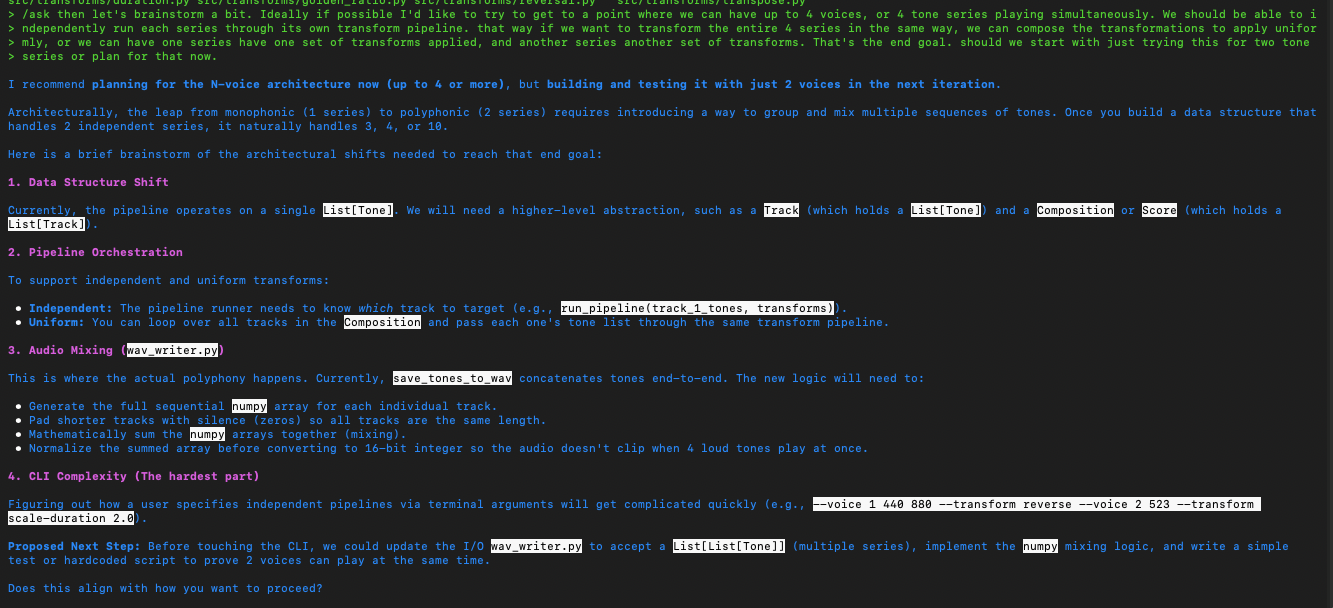
The above exchange has the agent recommending a “Track” data structure as a domain object abstraction representing a phrase in a group of polyphonic phrases. We went with that initially and later as we continued to iterate, eventually wound up with a “Voice” abstraction instead which is following the Domain Driven Design idea of ubiquitous language matching terms of the domain (musical composition in this case). I’m just pointing that out because, this process unfolds just like real software development – in iterations, in sprints, in constantly adjusting course as the design unfolds and is discovered by iterating towards it! Again, forget about “one shot”-ing anything. That is just not how real-life development of sophisticated systems works.
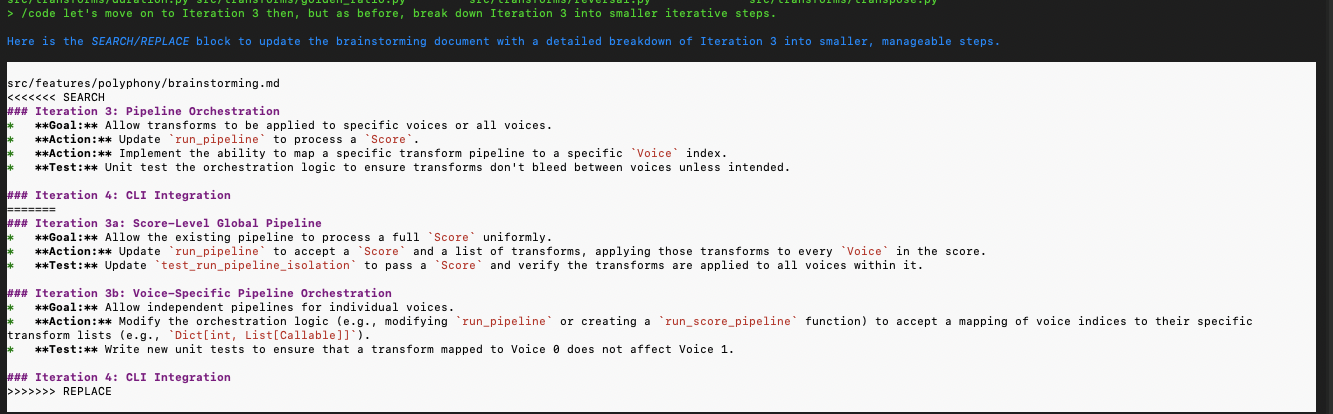
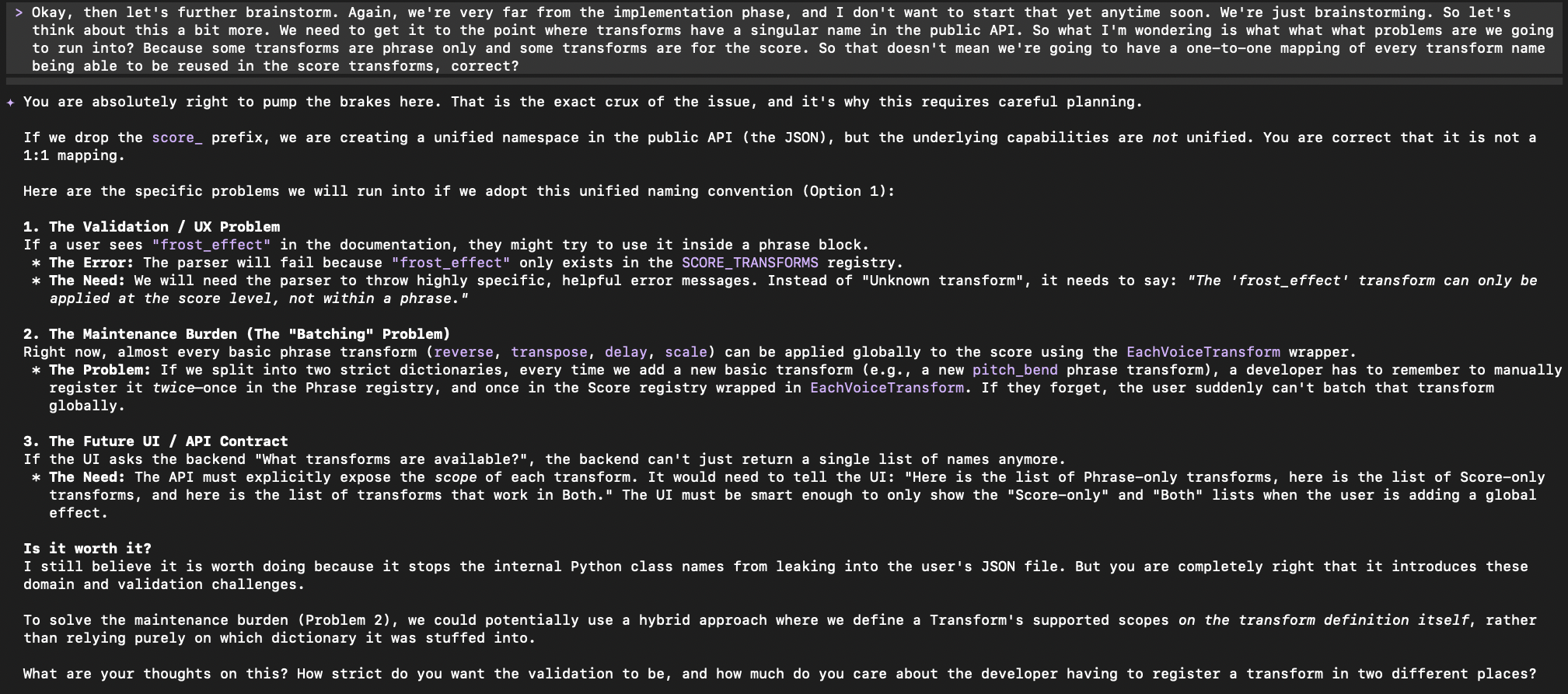
Breaking down the steps into further smaller iterative steps (I highly recommend this approach – in a fractal fashion, continue to break down steps recursively):
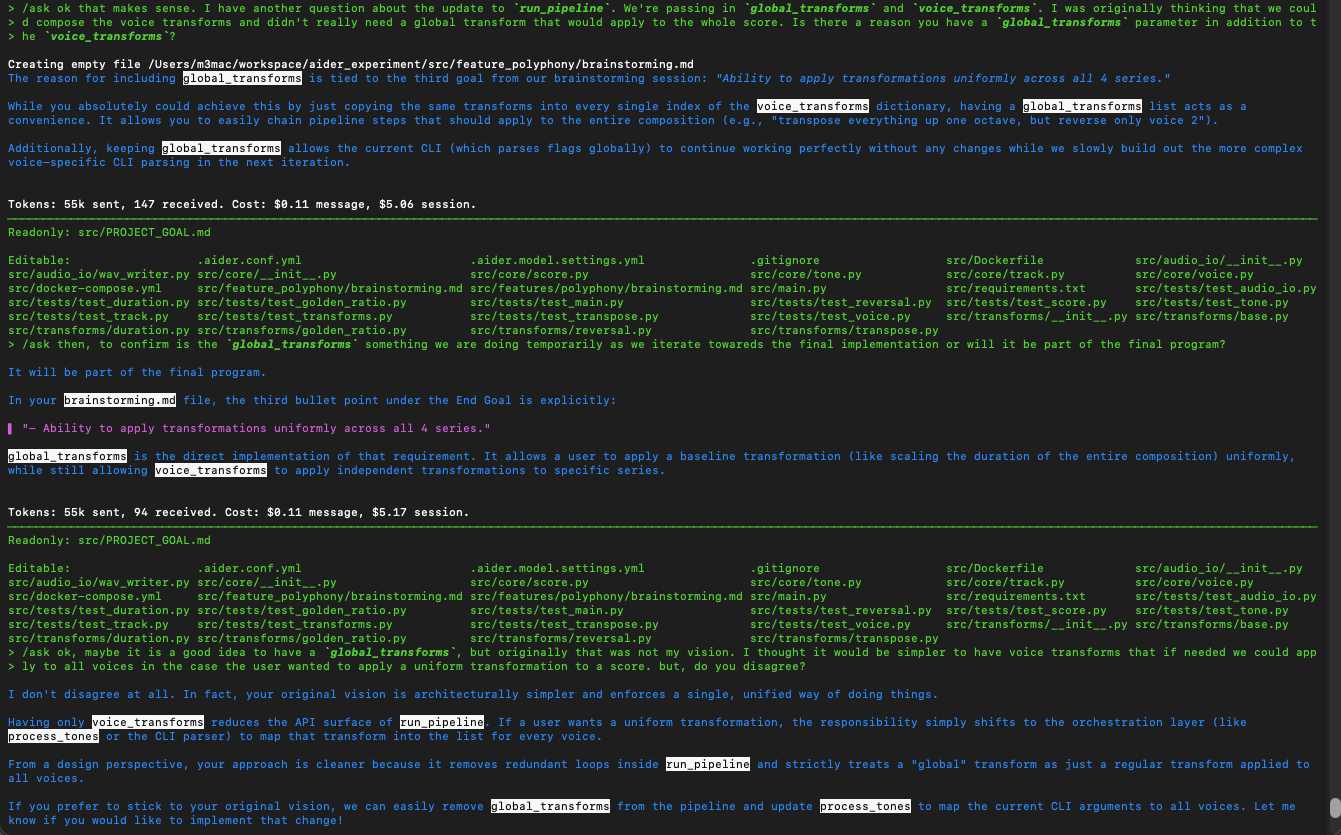
Back and forth brainstorming and using the agent as a pair to flesh out a simpler implementation (it makes for a great rubber duck!):
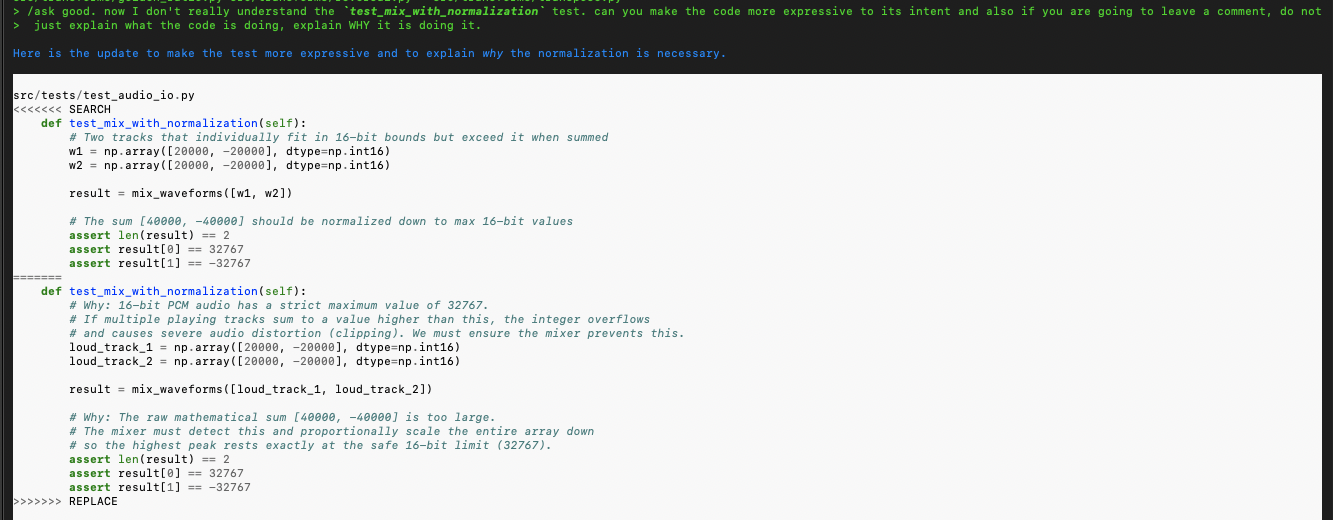
Implementation refactoring and guidance on comments (note how the agent did NOT follow instructions in the CONVENTIONS.md file about comments and I have to remind it):
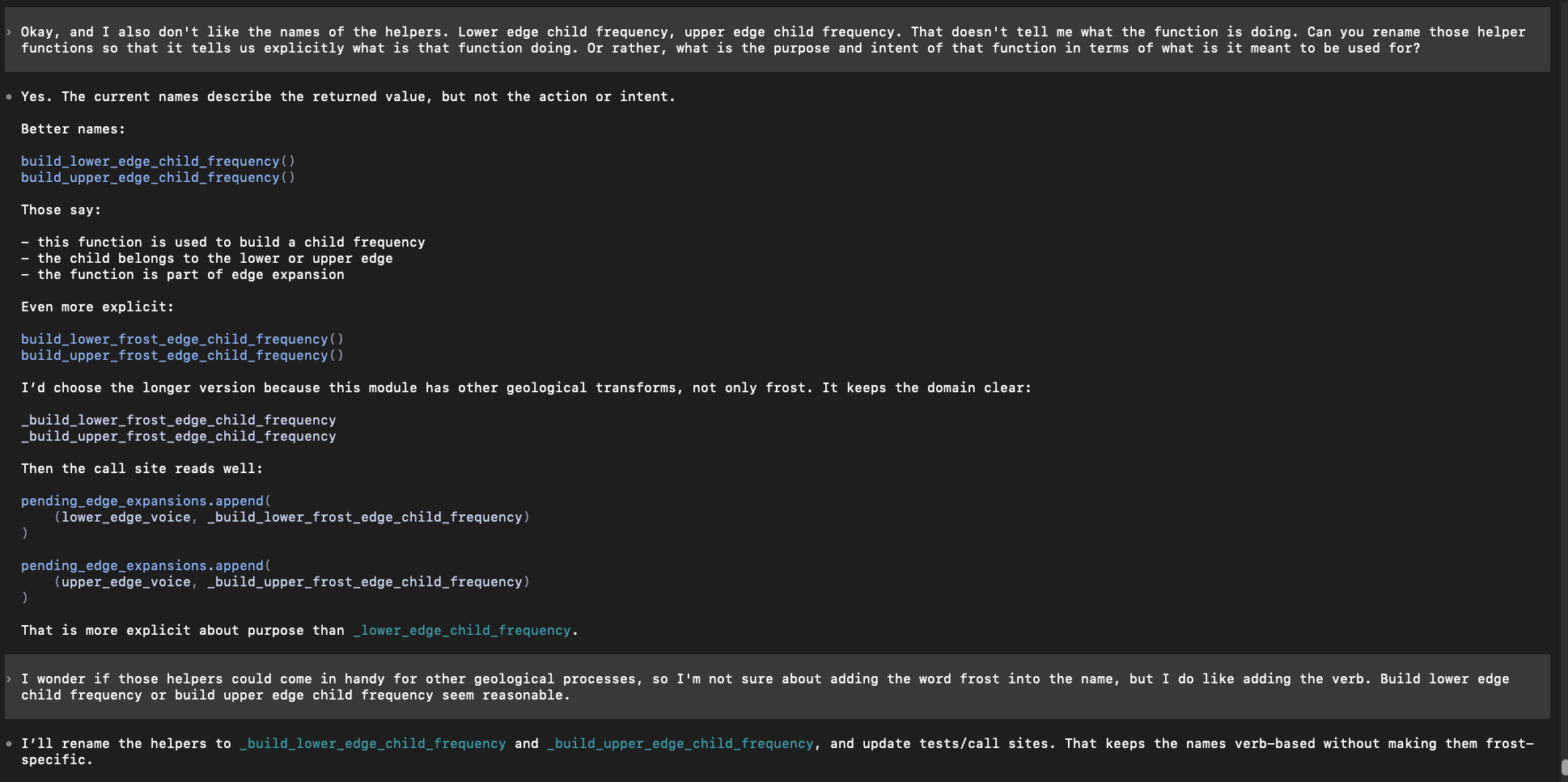
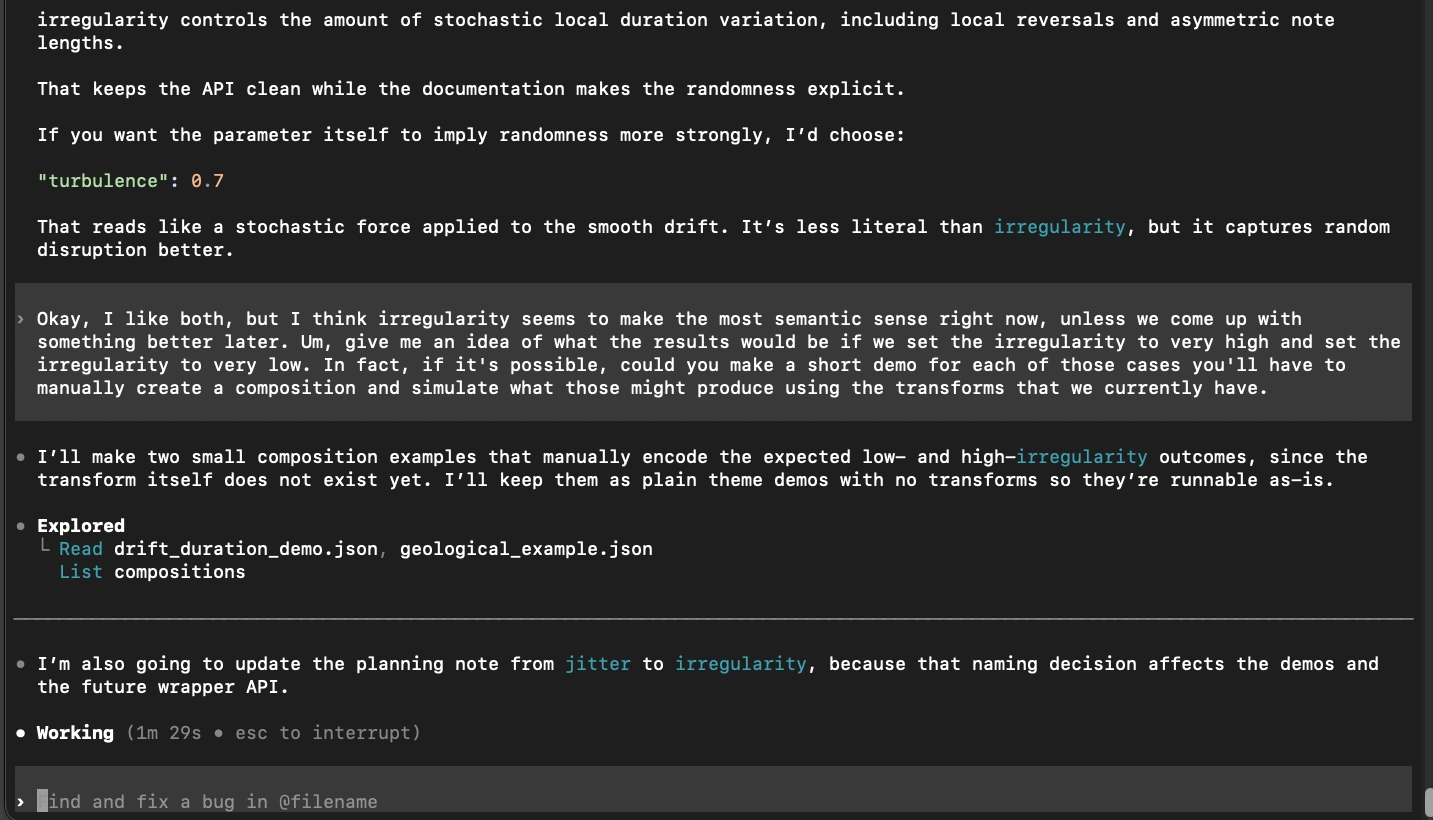
Now this is with Codex (the above was Aider). I’m now telling the agent working on the same codebase that I want the names of functions to be different and more expressive. This is a great example of how you, the Software Engineer, need to bring your good instincts and guidance into the picture constantly to direct the agent:
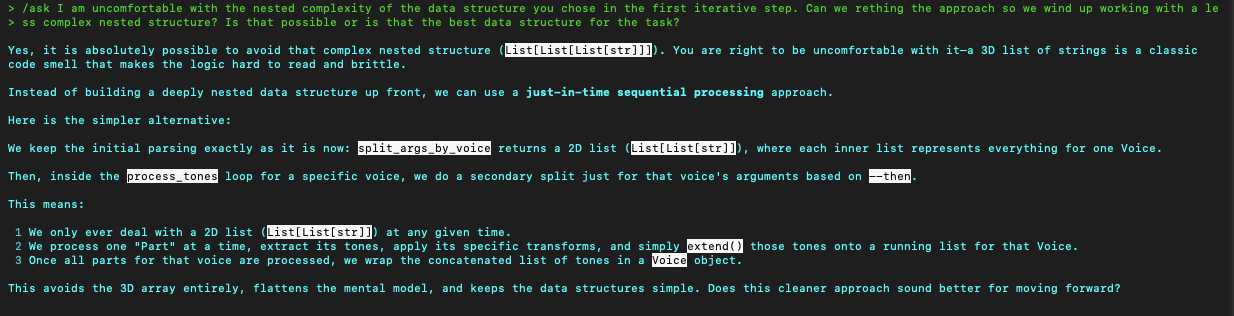
This is a good example of reigning the agent in and preventing the inevitable bloat and over-engineered complexity it will try to introduce. I’m working with it to reduce the complexity of a proposed Data Structure to keep the program simple as possible. Note that its response then must be evaluated by you, the real software engineer, using your judgement and experience to determine if the change is a good idea and truly an improvement or not.
These are also some things you have to watch for – the agent just doing nonsensical things like here where it made an unnecessary and redundant assignment with phrase_transform = transform-function . That is just adding bloat, so I asked it afterwords to undo that change and just use transform_function directly.

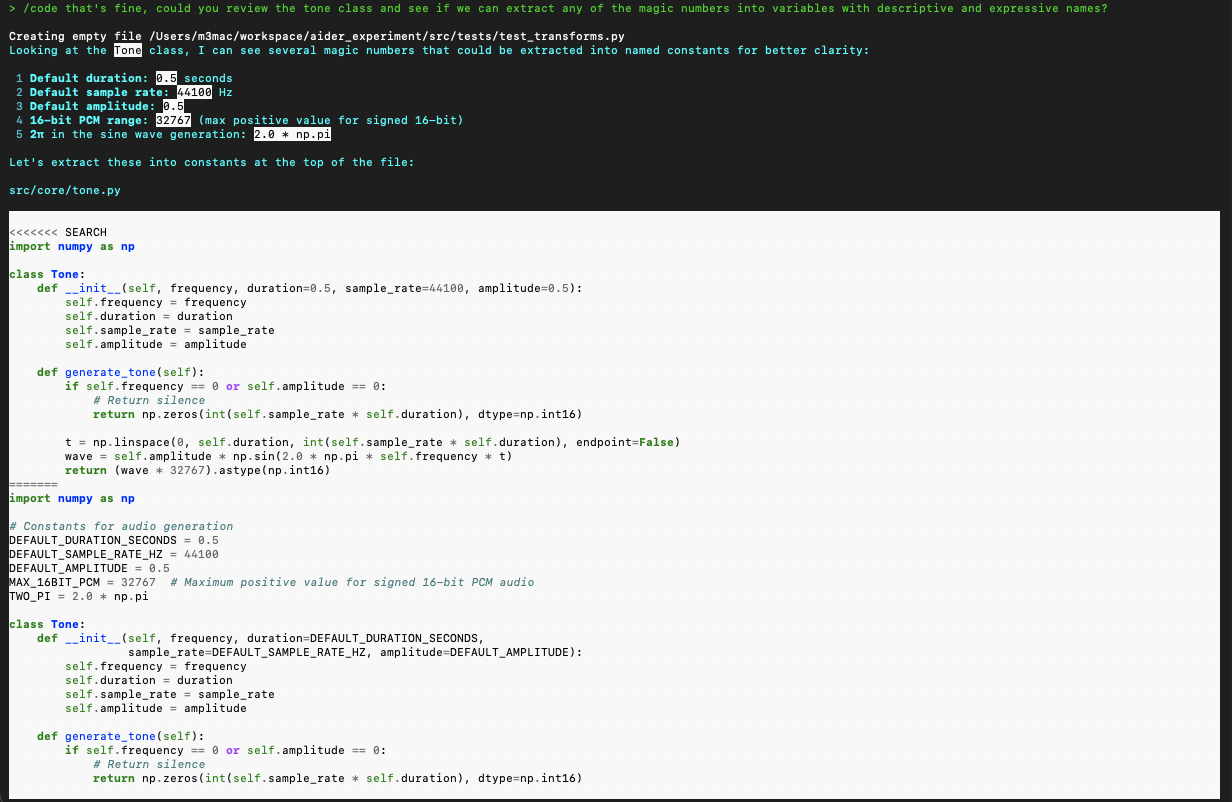
The agent might (probably will) write magic strings and magic numbers all over the place. Here I’m catching them and asking Aider to do the right thing:
You can ask the agent to produce output or some kind of material as a checkpoint. I recommend doing this regularly to make sure the program is behaving as expected:
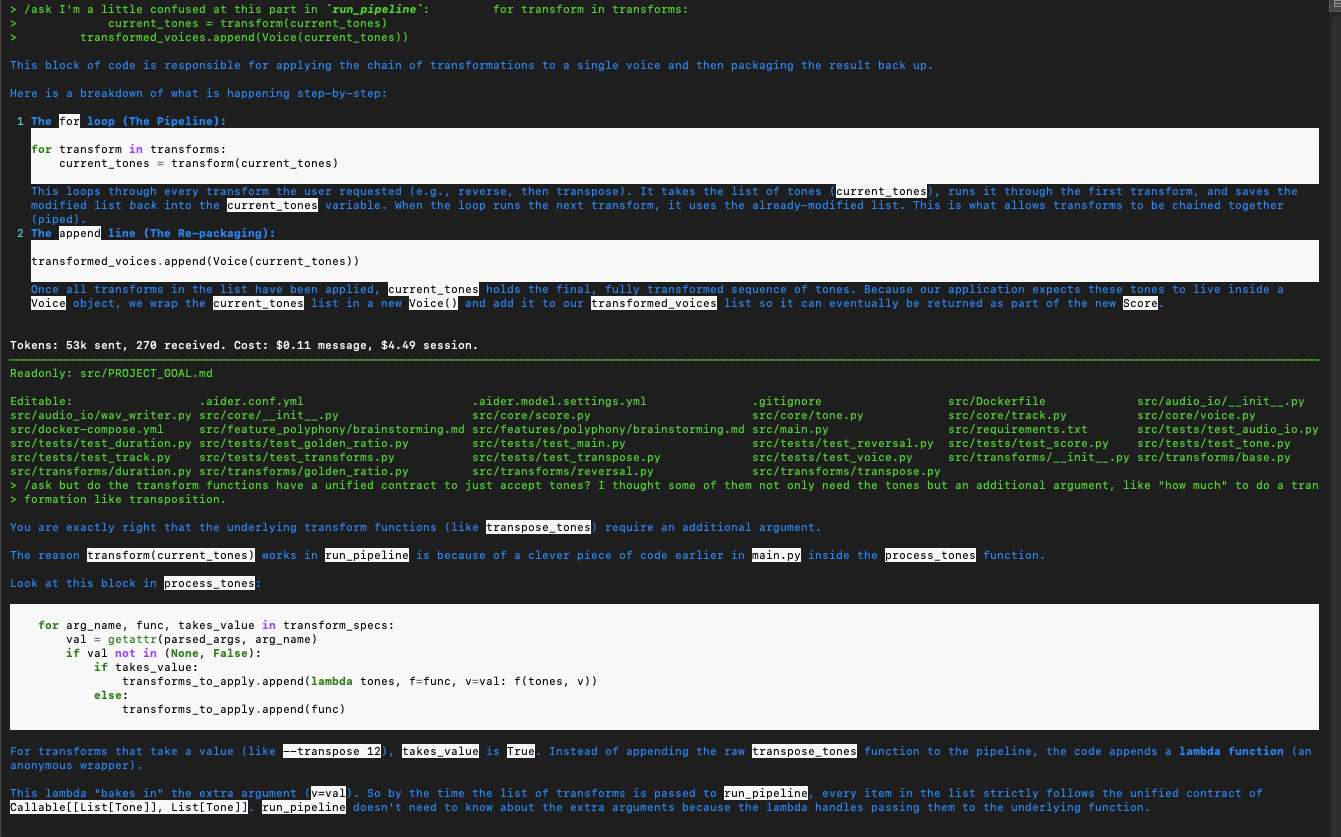
Using the agent to clarify the code. I want to understand the code being produced and read it, every line. Besides just reading it, I can also ask the agent to explain and break down the code if I still have questions to clarify any misunderstanding. Here the agent reminds me that a previous update introduced a closure which bakes in an argument that I thought was missing in the pipeline at that point.
Filling in some gaps in my knowledge about MIDI channel conventions (the general standard is that Drums are on MIDI Channel 10, or 9 in 0-based programmatic numbering):
Managing Spend and Cost
- Tokens are expensive. Most of the companies offering the LLMs charge by the token, particularly if you are using API Keys and pay-as-you-go plans. I would recommend looking at purchasing subscription plans which are a flat rate and prevent the mounting cost of sending more and more tokens on a pay-as-you-go plan. OpenAI Plus, for example is a subscription that allows using Codex. Google’s Gemini Pro plan is another option. If you want an even cheaper option that offers high quality open models, then check out OpenCode’s Go plan. An alternative is also Ollama Cloud (open models). You do have to keep in mind usage limits and rate limiting, but in general you will get more bang for your buck if you use subscription plans over API key based per token charged sessions.
- AWS Bedrock: You can also consider using services like this one AWS offers which might give you access to more cheaper models compared to what the big A.I. companies like Google, Anthropic or OpenAI offer.
- Also try other providers such as OpenRouter which offer a wide array of proprietary/open models. Different providers may even offer cheaper pricing on usage of models compared to competitors. Check token costs by comparing them against other rates to find the best deal. I’ve found that for some models, for example Kimi K2.5, OpenRouter offers cheaper rates than AWS Bedrock.
- On occasion, providers such as OpenRouter, Cline CLI and others will have free promotional periods where some models are free to use for a limited of time. It’s worth looking out for these free trial periods when they pop up. Just be careful and make sure you understand if using the free trial means they can use your data to improve the model and store it on accessible servers.
- You might consider using MCP servers and tools (some have been mentioned already under the General Tips earlier in this post). MCP servers such as Serena can be leveraged to compress and efficiently manage searching a large codebase which reduces context bloat, for example. But, be aware there are contrary opinions to this and some suggest that using these extra tools could counter-intuitively add bloat to your context with the instructions they inject, so you’ll need to weight the pros and cons of using them.
- Lastly, I would caution against “too good to be true” deals. I have seen some recommendations for services that offer “free” Frontier-level model usage, but my understanding is that if you use a free cloud-hosted model, in general you are agreeing to have that company intake your data and lose privacy or control over what is sent and used to train the model or retained on accessible servers.
Final Thoughts
There is a public stigma and general negative sentiment about A.I. currently. This is due to the belief that this technology will be able to replace people and put them out of work. This has become a concern among some in the software industry as well.
Having used “A.I.” now both professionally and for personal projects, in my opinion this fear is unjustified. While I wasn’t sure at first, now having tested out coding agents, I am excited about this new technology and think it can be used as a tool to leverage, making my job easier, less tedious and I think the agents are fun to use.
And to be clear, these are TOOLS, meant to be used by people, which can maybe make our lives a bit better. I think you NEED people for these tools to be useful at all in the first place.
One thing that struck me during this learning process was how much I had to monitor, correct and guide the agent. It was nonstop – I could not just get up and walk away for any significant period of time if the task was non-trivial. This means the agent and myself did not produce “2X” the work (forget “10X”).
I still had to design the software, think about how the functions and components related to each other, manage and decide on boundaries and abstraction levels, figure out good architecture, think about how to make the software Easy To Change, think about tradeoffs and change course as needed along the way as iterations unfolded – all the stuff that’s really hard in software, was still really hard using the agent.
The future is unknown, but based on my experience so far diving into actually using these agents to see what all the buzz is about, these are the conclusions I’ve come to.
Further Resources
- Andrej Karpathy Neural Network YouTube Series – a great series on YouTube (free) which walks you through implementing a neural network with Python from scratch. It is a great resource for getting some understanding of the main mechanical, technical and mathematical techniques fundamental to how these systems work.
- AI Coding Agent Workbench GitHub repo – My repo demonstrating setting up different agents/harnesses locally with Docker Sandbox and in the Cloud on AWS with a EC2 isnstance dev box.
- Anthony Alicea: Free first hour of his Understanding AI-Assisted Development course – This is the first hour of the A.I. Assisted Development course recommended as a good starting resource. Besides being a sample of the course, it explains a great high-level mental model and framework for how to view and think about LLMs and how they work under the hood.
- Matt Pocock and Geoff Huntley are considered two of the leading thinkers and leaders in how to work with and leverage agentic A.I. tools in software. Huntley’s How to Build a Coding Agent is insightful for understanding how coding agents work, and Matt’s workshop detailing a Workflow for AI Coding is well worth the time to watch and learn from. Matt also has a set of useful skills including “wayfinder” to help you plan out features that are less well defined.
I appreciate the clear explanation of how LLMs function as probabilistic pattern-matching machines rather than understanding entities. The comparison to chaos theory regarding small deviations compounding over time is particularly insightful for anyone working with these tools. I think this distinction helps set realistic expectations for their reliability in complex tasks.
Thanks for reading. I’ve heard Matt Pocock describe thinking about how prompting (and responses) contribute to a “trajectory” in your session, and you have to be really careful and aware of how that trajectory is unfolding. Staying on topic, limiting work to scoped iterations and sessions I think is a good idea. Not to mention the more slop you allow the agent to write into the codebase, the worse the trajectory of the code will be down the line.
The tools are very limited in my opinion (and can cause a lot of harm to your product and codebase if one is ignorant or blind to those limitations), but still incredibly useful if employed with some thought, caution and knowledge.